
Garmin has changed how apps like NOYU can access its data, and at the moment NOYU can't receive anything from Garmin directly. Garmin hasn't said when that will change. Until it does, there are two ways to keep most of your Garmin data coming in.
TL;DR
- On an iPhone: share Garmin Connect with Apple Health, then connect Apple Health in NOYU. It's two steps and takes a couple of minutes. Your sleep, workouts, steps and heart rate then come through every day, but not HRV, routes, power or Garmin's workout names.
- With TrainingPeaks Premium, on any phone or the web: connect TrainingPeaks in NOYU. Your workouts come through in full detail, with sleep and HRV, but not your steps, daily calories or most routes.
- If something doesn't come through, see Troubleshooting Apple Health below.
Garmin Connect can share your sleep, workouts and daily activity with Apple Health, and the NOYU iPhone app reads Apple Health. It won't bring everything across, but it keeps your data coming in every day.
You need an iPhone for this, because Apple Health is only on iPhone. Do the Garmin step first, so your recent data is already in Apple Health when NOYU looks. On Android, see Through TrainingPeaks below.
Go through both steps, even if you think you've done some of this before. Where a step is already done, you'll see it and can move on.
1. Share Garmin Connect with Apple Health
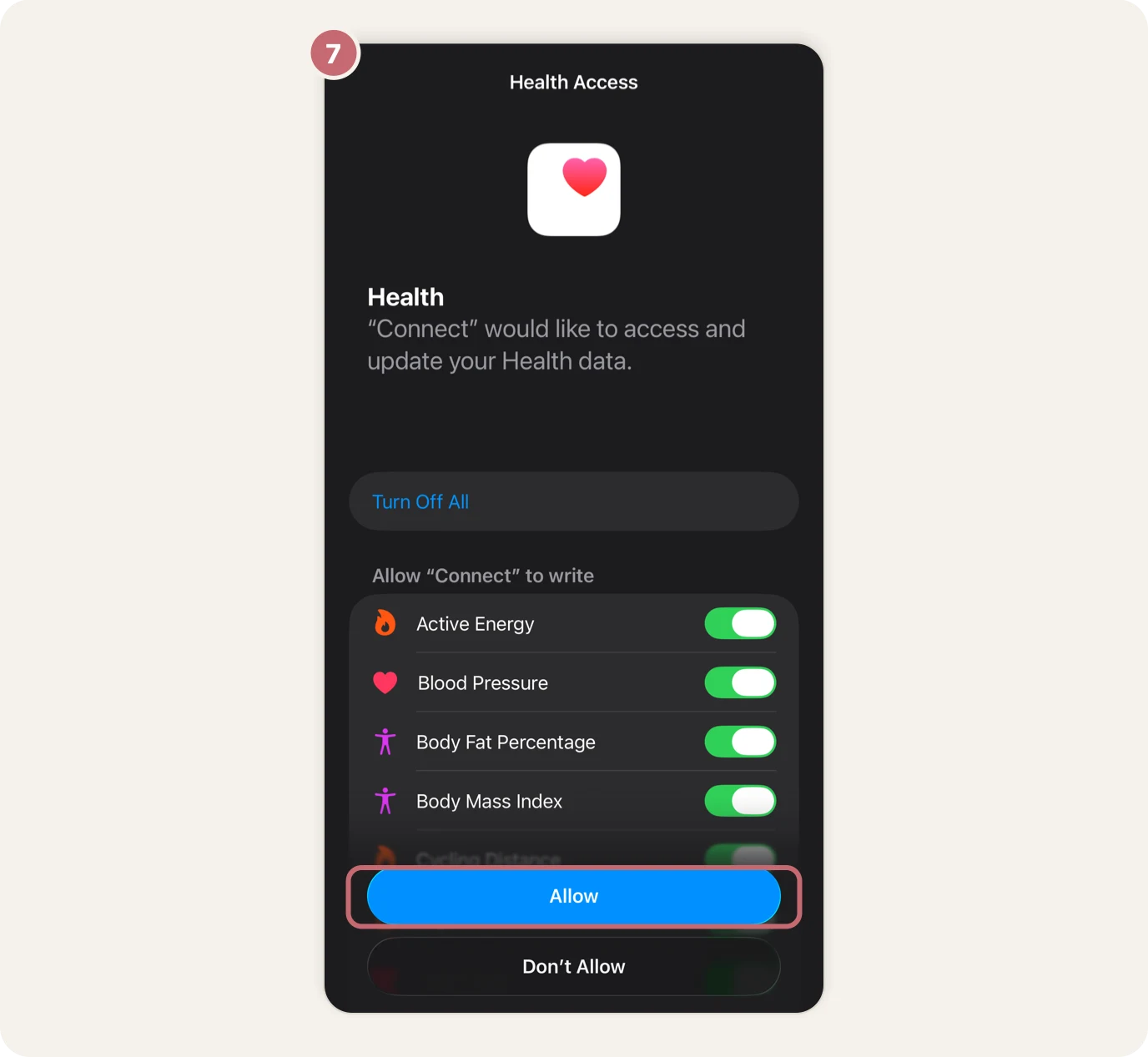
In short: in the Garmin Connect app, More → Settings → Connected Apps → Apple Health → Connect with Apple Health → Turn On All → Allow. Step by step:
- In the Garmin Connect app, tap More at the bottom right.
- Scroll down and tap Settings.
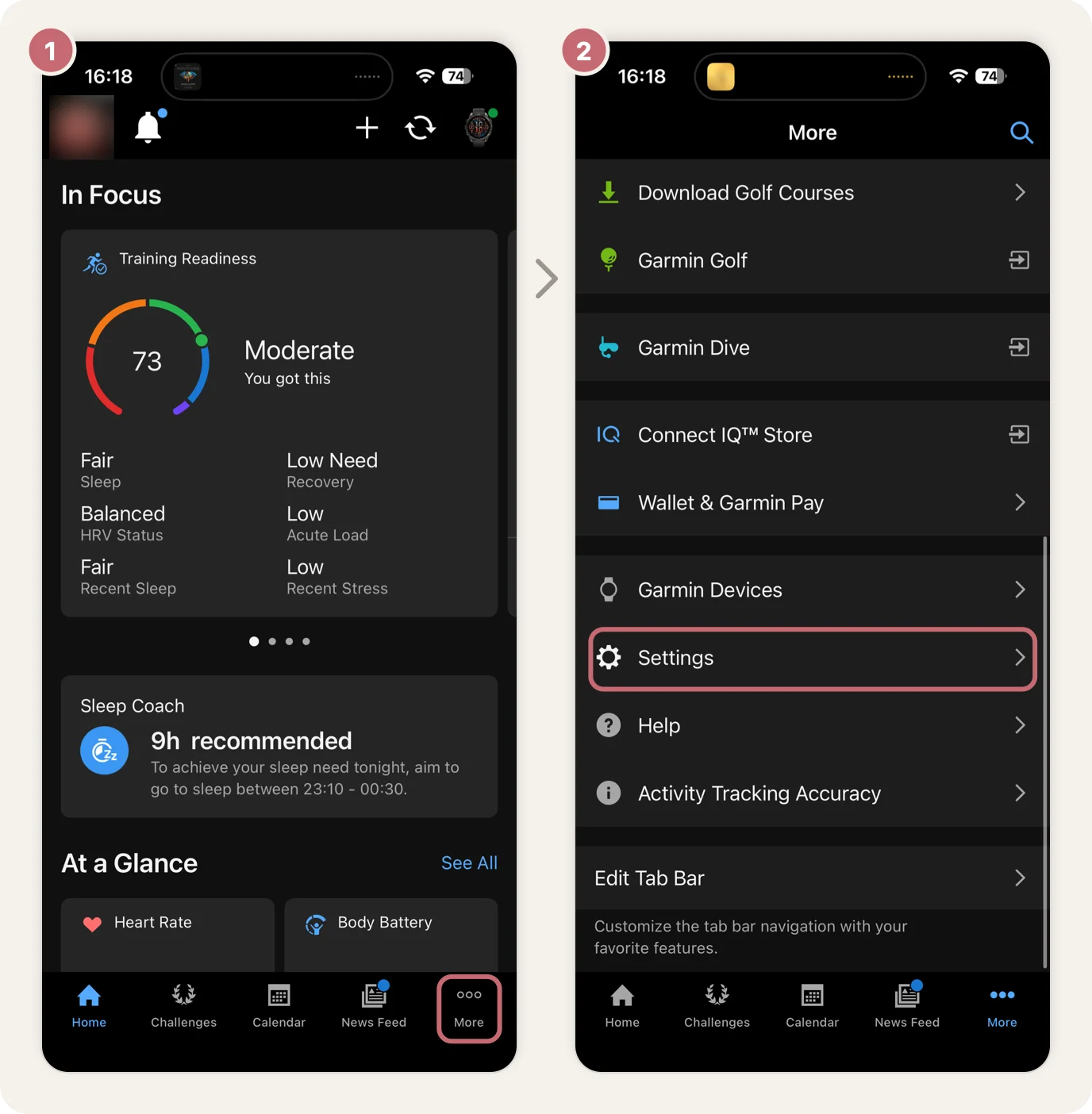
- Tap Connected Apps.
- Tap Apple Health.
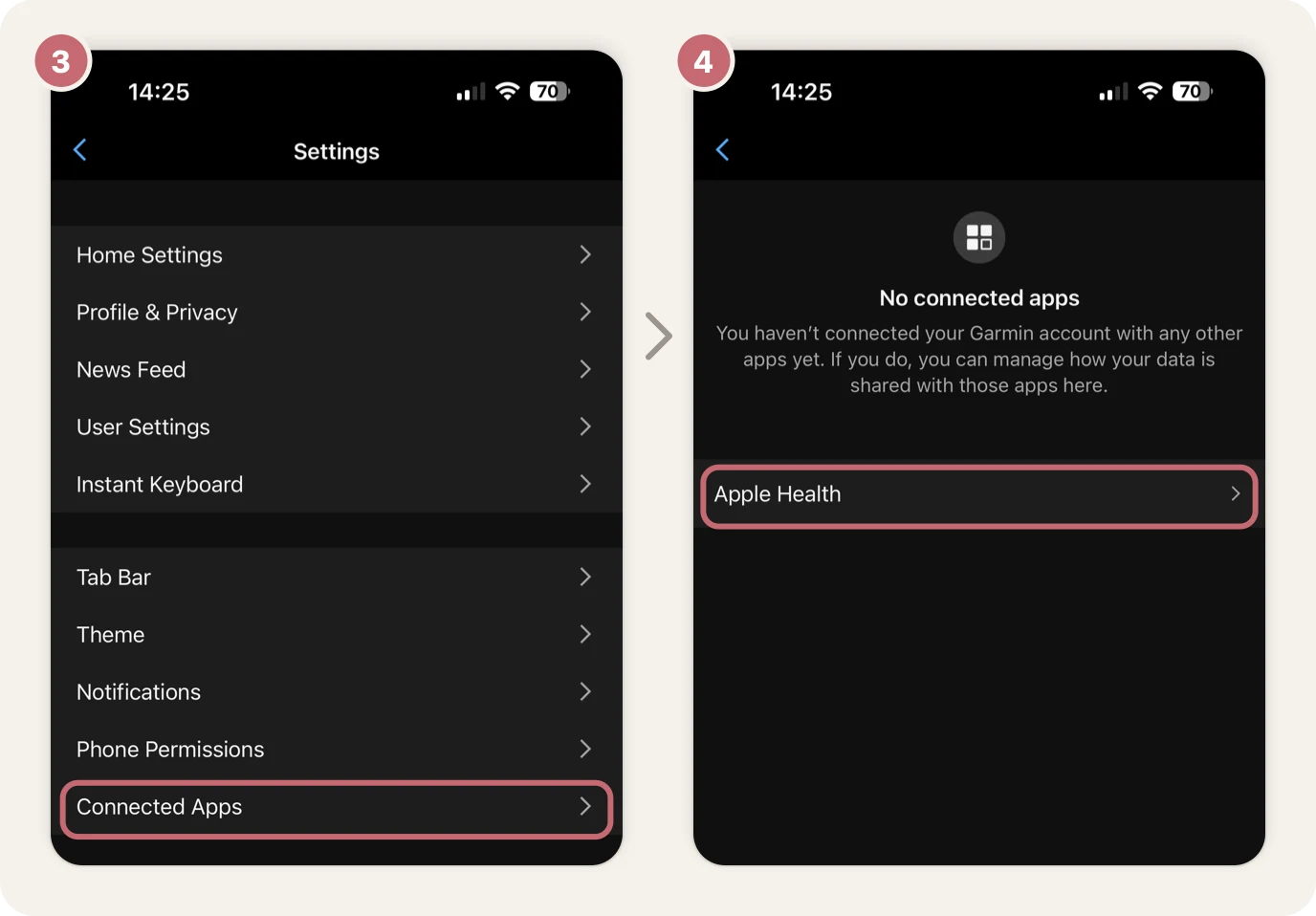
- Tap Connect with Apple Health.
- Your iPhone asks what Garmin Connect can share. Apple Health calls it "Connect". Tap Turn On All.
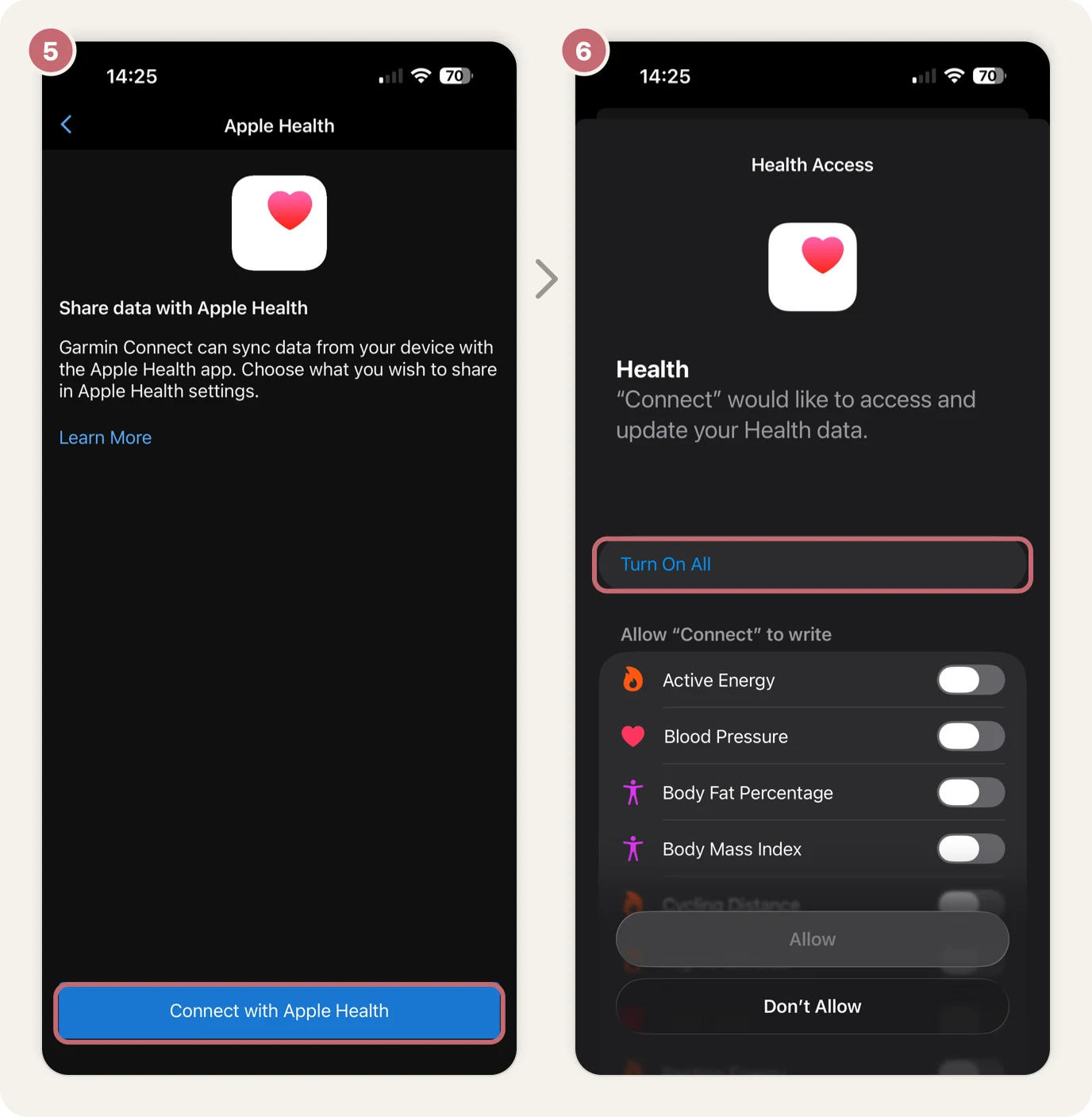
- Every switch turns on. Tap Allow.
2. Connect Apple Health in NOYU
If you don't have the NOYU iPhone app yet, get it from the App Store and sign in with your NOYU account.
In short: in the NOYU app, your profile → the settings icon → Connections → Add → Connect next to Apple Health → Turn On All → Allow. Step by step:
- In the NOYU app, tap your profile at the top left.
- Tap the settings icon at the top right.
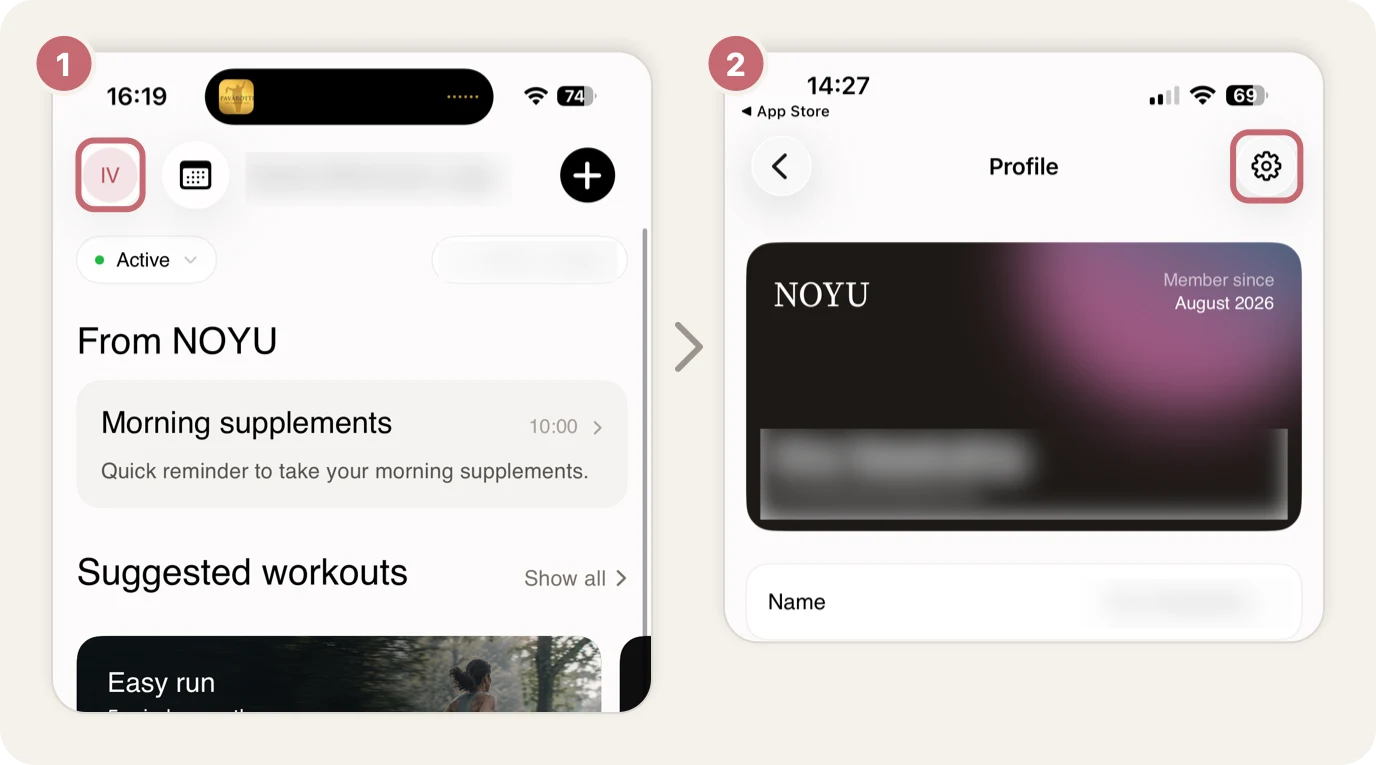
- Tap Connections.
- Tap Add.
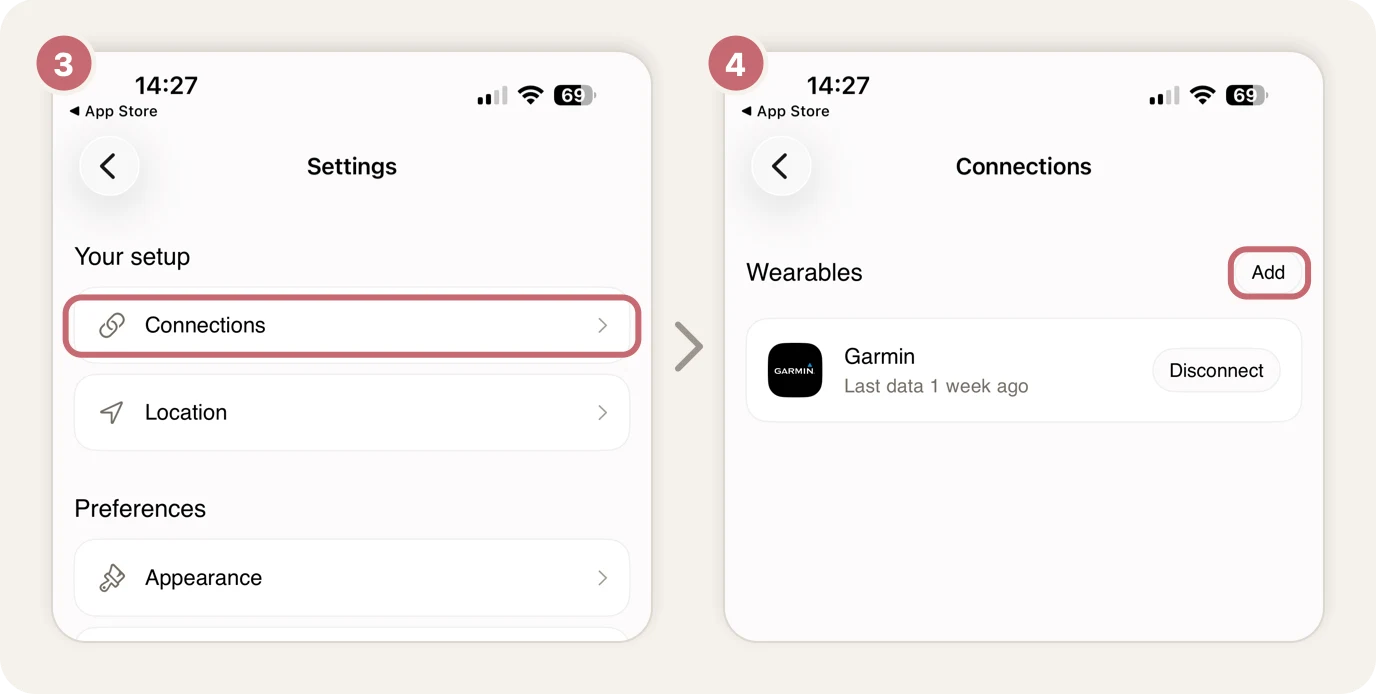
- Tap Connect next to Apple Health.
- Your iPhone asks what NOYU can read. Tap Turn On All.
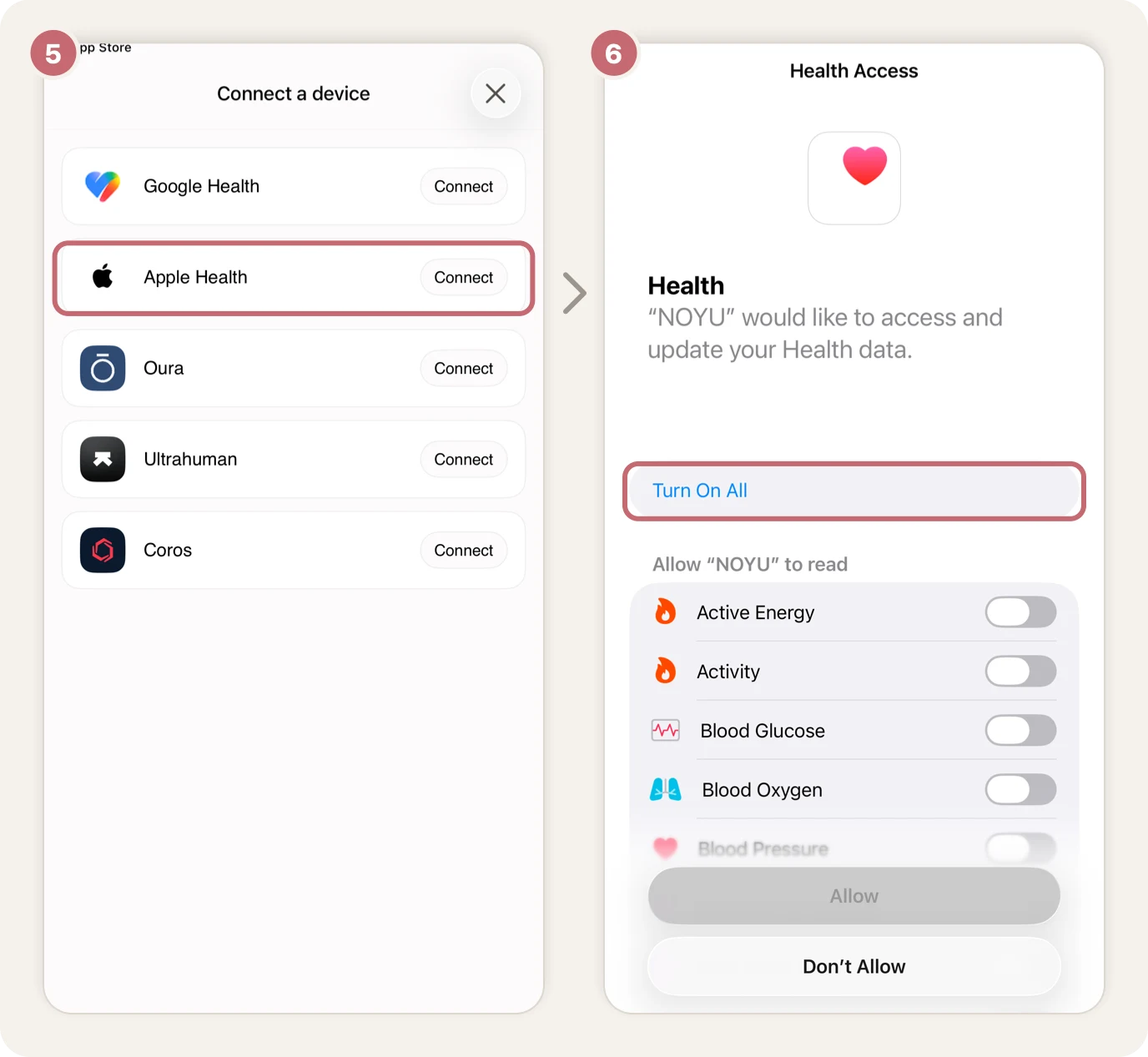
- Every switch turns on. Tap Allow.
- Connections now shows Apple Health as connected.
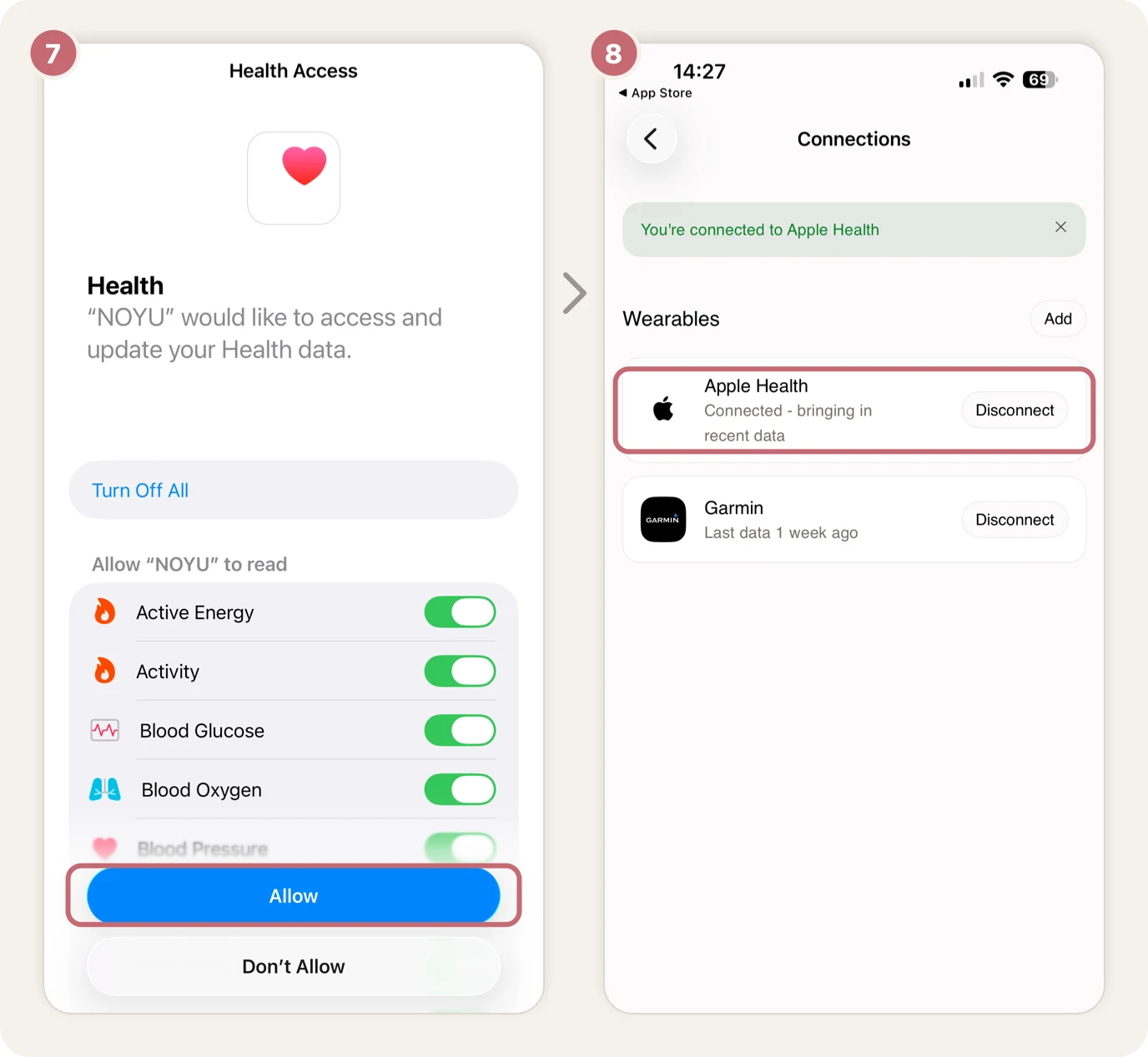
That's it. Your Garmin watch keeps syncing with Garmin Connect as usual, and Garmin Connect passes the data on to Apple Health.
What comes through Apple Health
- Sleep, including sleep stages
- Workouts, with their time, distance, calories and heart rate
- Steps and calories for the day
- Heart rate and resting heart rate
What doesn't
Garmin shares less with Apple Health than a direct Garmin connection gives NOYU:
- HRV, so Readiness has less to go on
- Workout detail: heart rate only every couple of minutes, and no route, pace, elevation, power or cadence. These workouts have no map, splits or climbs, and don't count towards your fastest times.
- Garmin's own workout names and sleep score: workouts arrive with a general name, such as "Cycling"
- Sending planned workouts to your watch, which needs a direct Garmin connection
Keeping it up to date
Apple Health data lives on your phone, so NOYU picks it up from there. Opening the NOYU app is the quickest way to bring in last night's sleep.
How far back your history goes depends on what Garmin Connect has already shared with Apple Health.
Through TrainingPeaks
If you have TrainingPeaks Premium and your Garmin syncs to it, NOYU can read your Garmin data from there. It works with any phone and on the web, so it's the way in if you don't have an iPhone. TrainingPeaks is new in NOYU, so tell us if anything looks off.
- Check Garmin Connect is linked to TrainingPeaks. If you train with a coach on TrainingPeaks, it usually is. If not, in TrainingPeaks go to Settings, then Apps & Devices, add Garmin, and choose to sync your activities and your daily health metrics.
- In NOYU, on your phone or the web, tap your profile at the top left, then the settings icon at the top right, then Connections. Tap Add (on the web, +), choose TrainingPeaks, then sign in to TrainingPeaks and allow access.
What comes through: workouts with heart rate, pace or speed, power, cadence and elevation through the whole session, and your coach's session names. Sleep, HRV and resting heart rate too, when Garmin sends its daily health metrics to TrainingPeaks, though sleep is less detailed than Garmin's own.
What doesn't: your steps and calories for the day, and the route for most runs and rides.
On an iPhone, you can use both. TrainingPeaks adds HRV, which Apple Health doesn't pass on, and when the same night or workout arrives from both, NOYU keeps one copy, so nothing is counted twice.
Troubleshooting Apple Health
Nothing arrives from Garmin
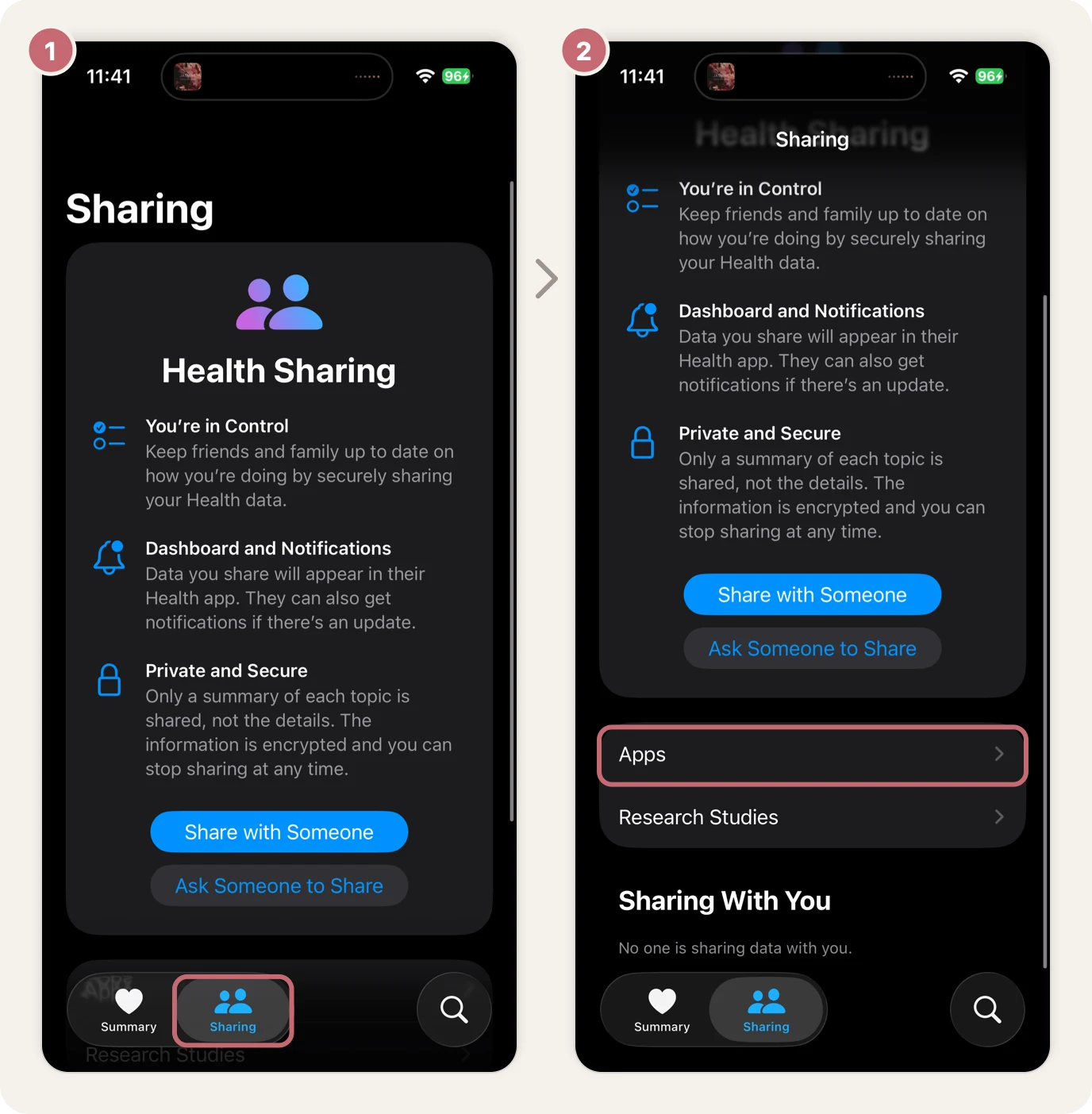
- In the Health app, tap Sharing, then Apps. If Connect isn't in the list, Garmin Connect isn't sharing yet: do step 1 above.
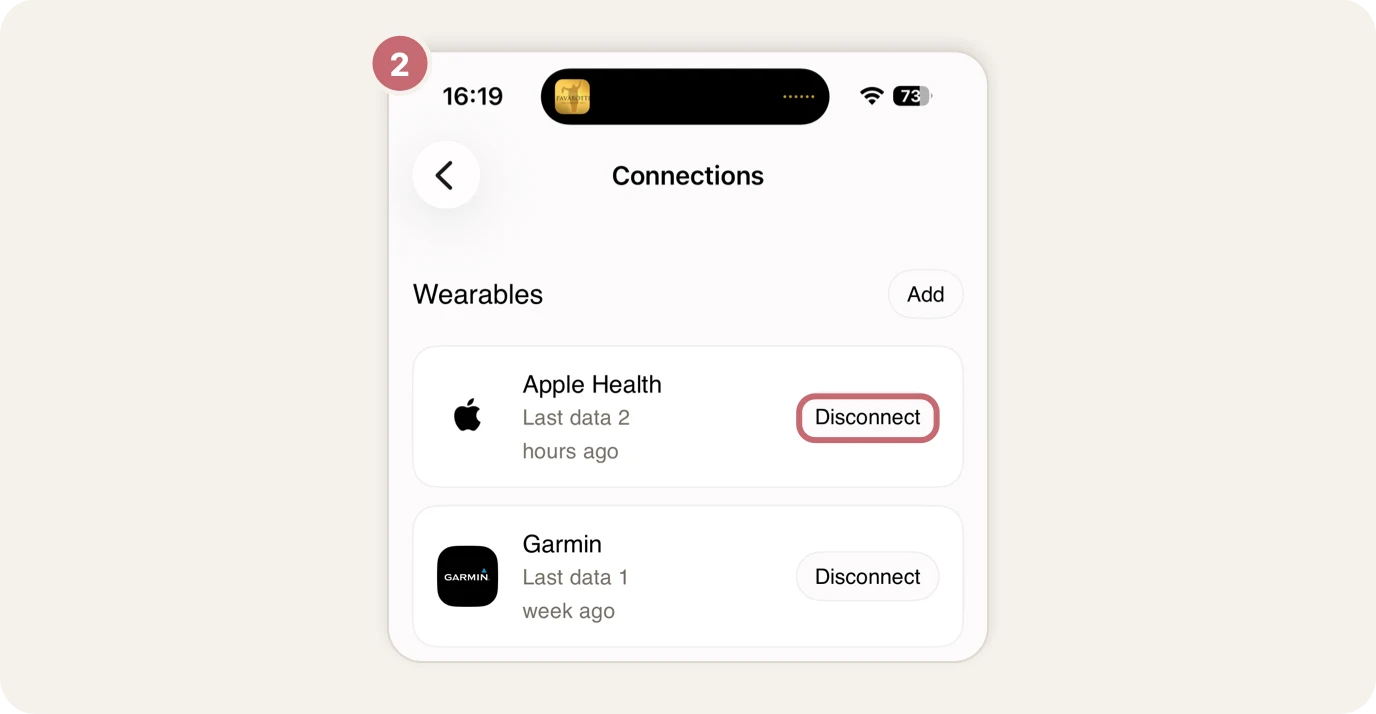
- If Connect is there, open the NOYU app, go to Connections and tap Disconnect next to Apple Health. Then connect it again (step 2 above, from Add).
Some data never arrives
Check both apps have full access.
- In the Health app, tap Sharing at the bottom.
- Tap Apps.
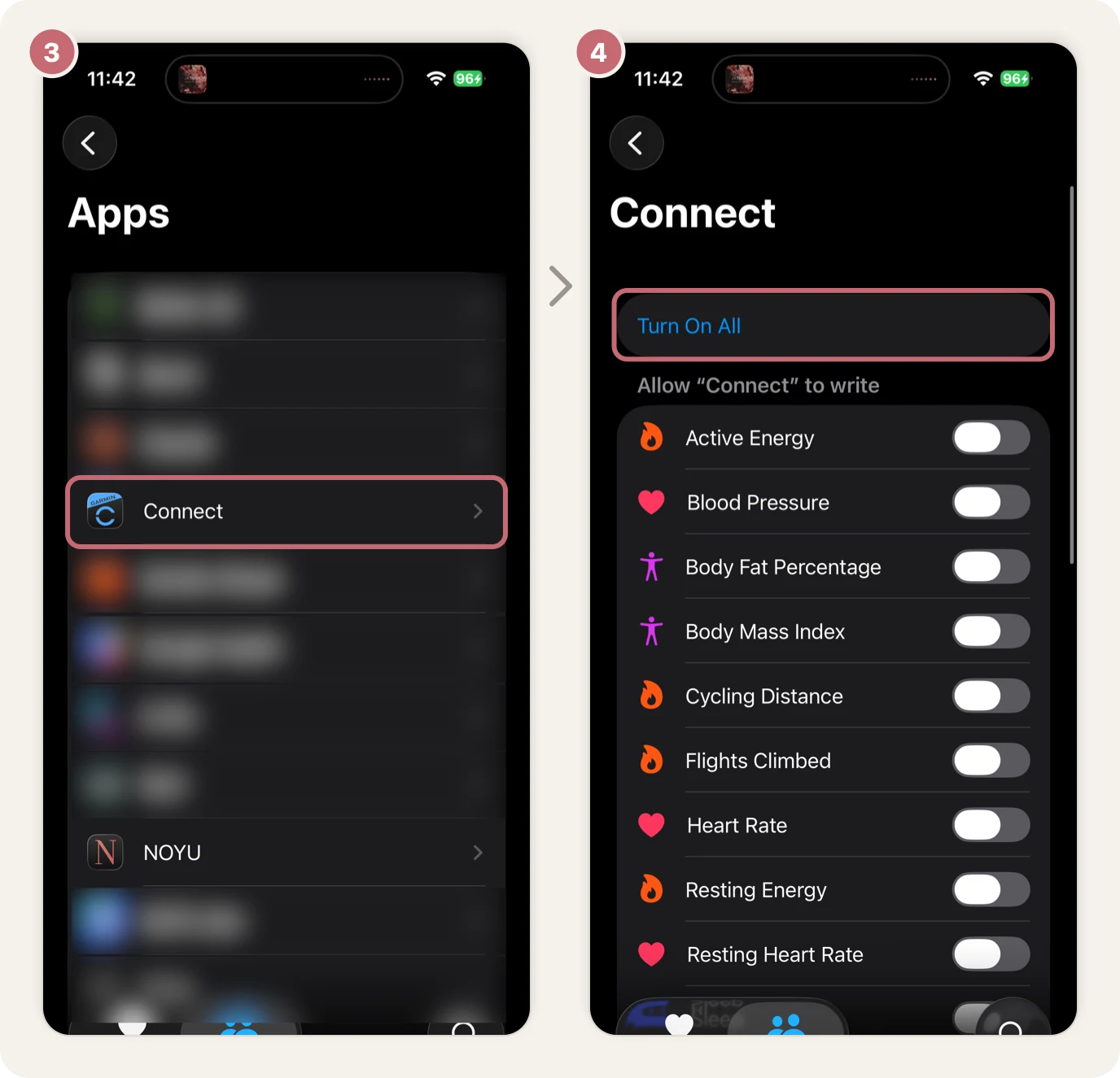
- Tap Connect.
- Tap Turn On All. Then go back and do the same for NOYU.
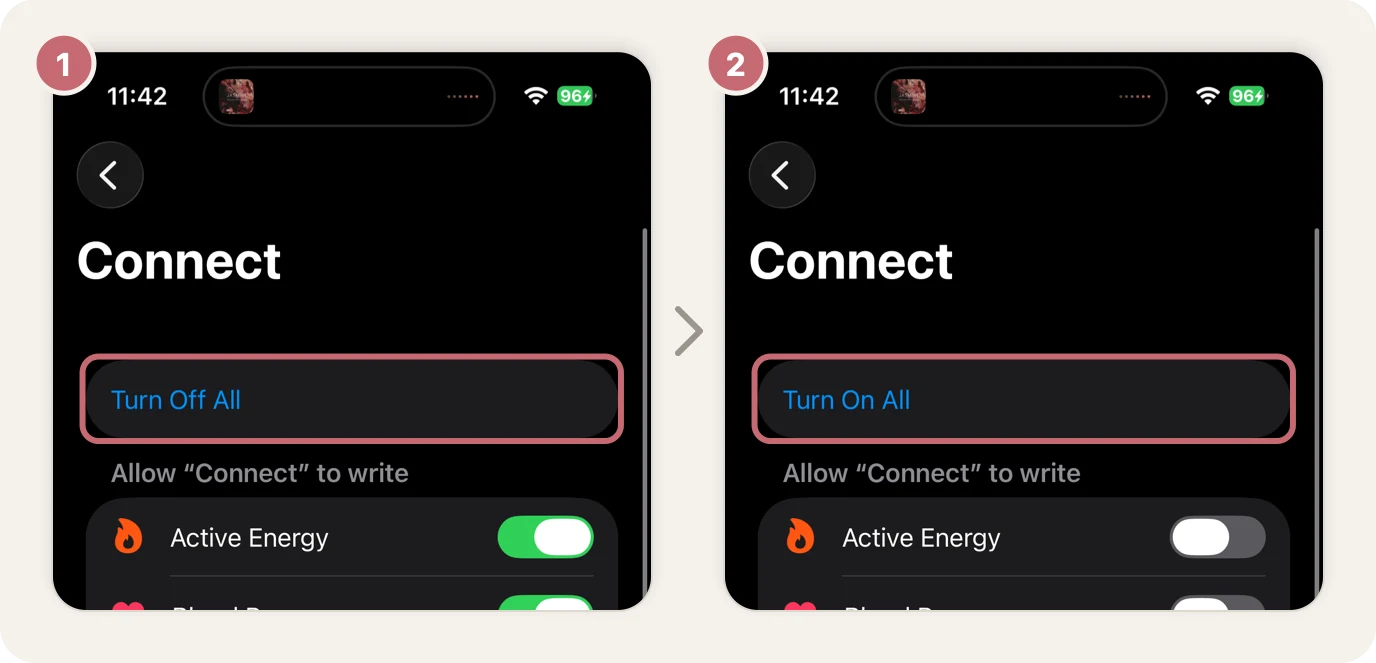
If a screen already says Turn Off All, everything is on.
Heart rate stops coming through
In the Health app, go to Sharing, then Apps, then Connect.
- Tap Turn Off All.
- Tap Turn On All.
Then open the NOYU app to bring in the latest days.
NOYU asks you to reconnect Apple Health
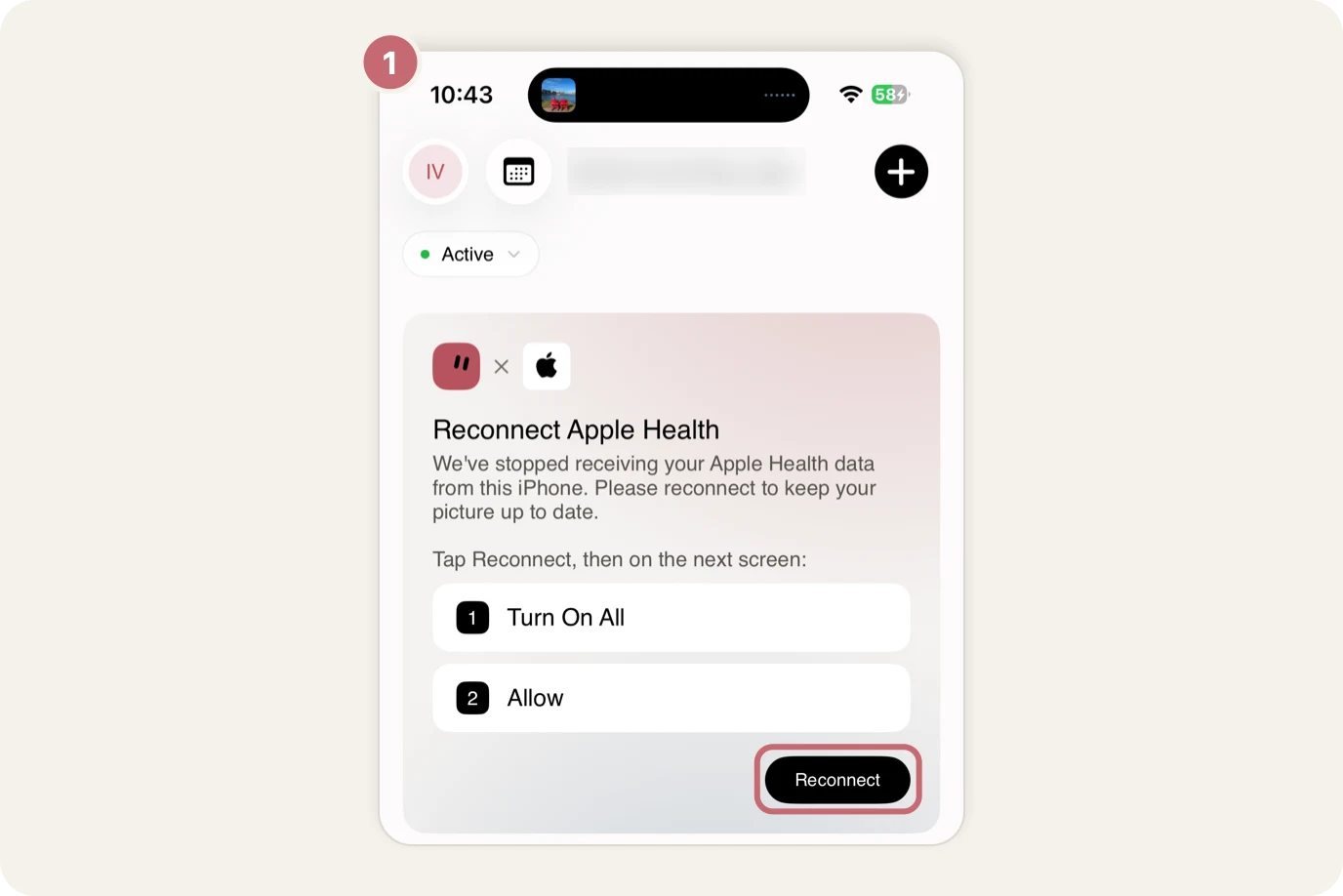
If NOYU's Home shows Reconnect Apple Health, tap Reconnect. Your iPhone then asks what NOYU can read: tap Turn On All, then Allow.
If your direct Garmin connection works again
You can leave everything connected. When the same night or workout also arrives through Apple Health or TrainingPeaks, NOYU keeps the Garmin copy by default, so nothing is counted twice.
